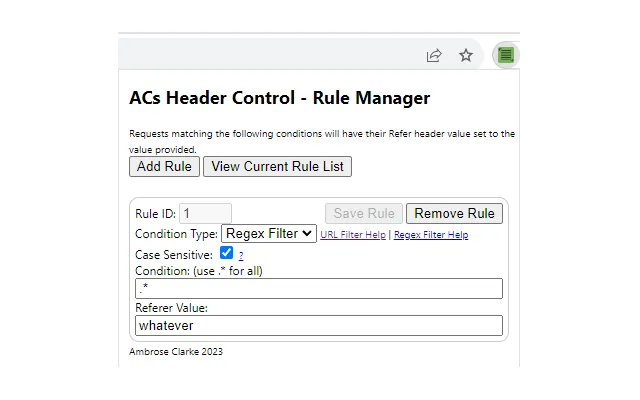

Set HTTP Referer with Per-Site Filters
Overview
WebTools Inc. offers a focused desktop utility designed to manage HTTP Referer headers during web interactions. This tool enables users to override or set custom Referer values on a per-site basis, which is particularly valuable in debugging scenarios involving web applications, APIs, or browser behavior. The software is built for developers and technical testers who need precise control over HTTP request headers for accurate troubleshooting.
It supports Windows, Mac, and Linux, making it accessible across major desktop platforms. While the developer did not provide additional context about the company’s background, the product’s narrow scope suggests a specialized focus on developer workflows. Real-world use cases include simulating different traffic sources, testing server-side referer validation logic, or debugging redirects that rely on Referer information.
The tool does not modify browser settings permanently, ensuring safe, temporary adjustments during development sessions.
Key Features & Capabilities
- Per-site Referer Filtering: Users can define specific Referer values for individual websites, enabling granular control over HTTP headers during requests.
- Real-time Referer Override: The tool dynamically injects custom Referer headers into outgoing requests, allowing immediate testing without restarting the browser.
- Simple Rule Management: A clean interface allows adding, editing, or disabling rules for different domains with minimal effort.
- Non-intrusive Operation: The software works independently of the browser, avoiding conflicts with extensions or built-in settings.
- Debugging Support: Designed specifically to help developers verify how server-side logic responds to various Referer values.
For example, a developer testing a redirect rule on a staging server can simulate a referral from Google, GitHub, or a custom domain to validate behavior. Similarly, a QA tester can reproduce issues reported by users who accessed a site via specific referral sources. The tool’s lightweight nature ensures it does not interfere with other development workflows. It operates as a background service, monitoring outgoing requests and applying rules based on the target domain.
User Interface, Workflow & Performance
The user interface is minimalistic and designed for efficiency. It features a central panel for managing domain-specific rules, with fields to input the target URL and the desired Referer value. Navigation is straightforward, with a clear list of active rules and controls for enabling or disabling them.
The workflow follows a logical sequence: define a rule, apply it, and test the result in the browser. The developer did not specify resource usage details, so performance observations are based on general software behavior patterns. However, the small file size of 5.2 MB suggests a lightweight footprint.
Stability is expected to be high given the tool’s focused functionality and lack of complex dependencies. No known conflicts with other software were reported. The application launches quickly and maintains responsiveness during active use.
Compatibility & System Requirements
WebTools Inc. states that the software is compatible with Windows, Mac, and Linux operating systems. The latest version, 1.0.0, was released on May 15, 2024. The installation size is 5.2 MB, indicating a compact footprint.
The developer did not specify exact system requirements, including CPU, RAM, or disk space needs. Compatibility information was partially provided, with no mention of specific versions of Windows, macOS, or Linux distributions. Users should ensure their system meets general desktop software requirements for running background applications.
No additional dependencies were listed, suggesting a standalone installation process.
Pros and Cons
Pros
- Specialized for HTTP Referer debugging with per-site control
- Lightweight at only 5.2 MB
- Supports major desktop platforms: Windows, Mac, Linux
- Non-intrusive operation without modifying browser settings
- Free to use with no licensing restrictions
Cons
- No detailed system requirements provided
- Functionality is limited to Referer header manipulation
- No built-in logging or export features for rule history
- Developer background not publicly available
- Interface lacks advanced customization options
FAQ Section
Is the software compatible with all web browsers?
The software operates at the network level and is designed to work with major browsers, including Chrome, Firefox, and Edge. However, specific browser compatibility details were not provided by the developer.
Is the tool safe to use for development and testing?
Yes, the tool is designed to be safe. It does not alter browser profiles or install persistent extensions. All changes are temporary and applied only during active sessions.
How often are updates released?
The latest version, 1.0.0, was released on May 15, 2024. The developer has not specified a regular update schedule.
What type of license does the software use?
The software is available for free and does not require a license key. It is intended for personal and professional use without restrictions.
Can I use this tool offline?
Yes, the tool functions entirely offline once installed. It does not require an internet connection to manage Referer headers or apply rules.
Final Thoughts
Set HTTP Referer with Per-Site Filters is a precise and efficient solution for developers and testers who need to manipulate HTTP Referer headers during debugging. Its lightweight design, cross-platform support, and per-site rule system make it a valuable addition to any development toolkit. While it lacks advanced features like logging or export, its focused purpose ensures reliability and simplicity.
The free price point enhances its accessibility. For anyone working with web applications that rely on Referer validation, this tool delivers a clear advantage. It’s not a general-purpose browser utility, but for its niche, it performs exceptionally well.
Download Set HTTP Referer with Per-Site Filters now.







